Posts

Showing posts with the label python

Multiprocessing

  Code Example # Multiprocessing # Way 1 from multiprocessing import Pool import time def f(x, y): for i in range(20): print(i, end="#") time.sleep(2) pool = Pool(processes=10) for i in range(10): pool.apply_async(f, [10, i])

How to solve the Liner Equation using Python

  Code Example # How to solve the Liner Equation using Python Example 1: [with Multiple variable] import numpy as np '''     8x+3y−2z=9     −4x+7y+5z=15     3x+4y−12z=35 ''' A = np.array([[8, 3, -2], [-4, 7, 5], [3, 4, -12]]) b = np.array([9, 15, 35]) answer = np.linalg.solve(A, b) print(answer)  

Frequently Asked Python Interview Question

  Practice Set 1 01)  How Python code Execute? 02)  Why Python is interpreted language? 03)  Why Python is known as a scripting language? 04)  What is PVM? 05)  How Python manages its memory? 06)  What is namespace in Python? 07)  What are built-in data types in Python? 08)  What is literal? 09)  What is docstring? 10)  How to create a custom datatype in Python? 11)  What is the difference between List, Tuple, and Set? 12)  What is faster between List and Tuple? Explain Why? 13)  What is the difference between Python List and Array? In both cases how memory allocates? 14)  If I want to update a Tuple how can I do it? 15)  How many types of dictionaries present in Python? 16)   What is the difference between Dict and OrderDict? 17)   What is the advantage of using Dict? 18)  You have a list how can you make sure all the elements in the list should be unique? 19)  What is  mo...

Play With Windows Registry using Python

Image
  Code Example Note **: Only For Windows User Suppose we are creating one windows application and that has some license key for what is the best place to keep that key so that no can hack it or reuse it. Let's start ..... We will be creating a Function for a different purpose  Example : # test.py import winreg as wreg def store_data_in_windows_registry():     my_key = "my-demo-key"     data = "Test data"     key = wreg.CreateKey(wreg.HKEY_CURRENT_USER, my_key)     wreg.SetValue(key, my_key, wreg.REG_SZ, data)     print("Data Set in Register") def get_data_from_windows_registry():     my_key = "my-demo-key"     try:         key = wreg.OpenKey(wreg.HKEY_CURRENT_USER, my_key)         return wreg.QueryValue(key, my_key)     except:         return "No Data Found" def clear_data_from_windows_registry():     my_key = "my-demo-key" ...

Requests Library in Python

Image
   Concept Python requests Library is used For API testing as well as API calls within a python script. By using the requests Library we can get a response as well as we can post, updated, delete data. This is mainly used for API calls with py script even we can use API token we can change the content type. Code Step 1: pip install requests Now it is ready to use Example 1: res = requests.get(url=<Your URL>, headers={ 'Accept': 'application/json', ...... }) print(res.status_code)    # ----- > you will be getting status code of response print(res.text)   # ------> response body print(res.content)   # ------> response body Example 2: res = requests.get('https://api.github.com/user', auth=('<Your Git Username>', '< Your Git Password>')) """ You will be able to login  in git by using request Lib """ print( res.headers['content-type'] ) print(res.json())   # ----> print the respons...

Reverse Shell in TCP using Python

Image
  Code Example To gain control over a compromised system, an attacker usually aims to gain interactive shell access for arbitrary command execution. With such access, they can try to elevate their privileges to obtain full control of the operating system. However, most systems are behind firewalls and direct remote shell connections are impossible. One of the methods used to circumvent this limitation is a reverse shell. # How its Work? In a typical remote system access scenario, the user is the client and the target machine is the server. The user initiates a remote shell connection and the target system listens for such connections. With a reverse shell, the roles are opposite. It is the target machine that initiates the connection to the user, and the user’s computer listens for incoming connections on a specified port. The primary reason why reverse shells are often used by attackers is the way that most firewalls are configured. Attacked servers usually allow connections only ...

Port Scanner using Python

Image
  Code Example What are Network Ports? Network ports are the communication endpoints for a machine that is connected to the Internet. When a service listens on a port it can receive data from a client application, process it, and communicate a response.  Port scanning is part of the first phase of a penetration test and allows you to find all network entry points available on a target system. Common TCP Ports Listing : 21 - FTP (File Transfer Protocol) 22 - SSH (Secure Shell) 23 - Telnet 25 - SMTP (Mail) 80 - HTTP (Web) 110 - POP3 (Mail) 143 - IMAP (Mail) 443 - HTTPS (Secure Web) 445 - SMB (Microsoft File Sharing) 3389 - RDP (Remote Desktop Protocol) To Run port scanner:  (venv) C:\Users\kuntal\Desktop\New folder\code-example\Port Scanner>python portscanner.py 192.168.1.103 Screenshot : Click Here For Raw Code Quiz Level 1 Quiz Level 2 Request Me

How To Create EXE File Using Python

Image
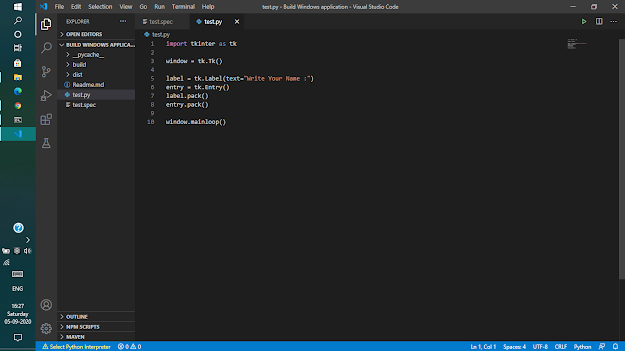
  Concept & Code Step 1:   > pip install pyinstaller Step 2: Create one python file "test.py" import tkinter as tk from tkinter import simpledialog root = tk.Tk() root.withdraw() user_name = simpledialog.askstring(title="MyApp", prompt="What's your Username?:")   Step 3:   > pyinstaller test.py --onefile Now Your EXE will be created and it is ready to be used.   # Advanced Section you can edit your test.spec file as per your requirement # -*- mode: python ; coding: utf-8 -*- block_cipher = None a = Analysis(['test.py'],              pathex=['C:\\Users\\kuntal\\Desktop\\ICSS\\ICSS\\Advanced Python\\Threading & Parameter Parsing\\Build Windows application'],              binaries=[],              datas=[],              hiddenimports=[],              hookspath=[], ...

How To Create Python Virtual Environments

Image
  For Linux User Open your terminal and run the following command Step 1:   sudo apt-get update Step 2:  sudo apt install python3-pip Step 3:  sudo apt install python3-venv Step 4:   python3 -m venv venv Step 5:  source venv/bin/activate   [ <-- To activate your newly create Virtual Environments ] For Windows User Open your terminal and run the following command Step 1:   pip install virtualenv Step 2:   virtualenv venv Step 3:  venv\Script\activate  [ <-- To activate your newly create Virtual Environments ] Quiz Level 1 Quiz Level 2 Request Me

How To Create .ENV File in Python

Image
  Env files allow you to put your environment variables inside a file. You just create a new file called. env in your project and slap your variables in there on different lines.  This env is used for storing your all id, password, keys all important credential so no on directly can get your data. Code Step 1: Create a virtual environment and make it active Step 2: pip install python-dotenv Step 3: Create a .env file Step 4: Create test.py in the same dir where you created .env file Now Check Code   test.py from dotenv import load_dotenv load_dotenv() import os my_site = os.getenv("DOMAIN") print("Visit My website : {} ".format(my_site))   .env # a comment that will be ignored. DOMAIN= https://thepyuniverse.blogspot.com Now Run test.py Output:  Visit My website :  https://thepyuniverse.blogspot.com Screenshot : Quiz Level 1 Quiz Level 2 Request Me

PostgreSQL With Python

Image
  Setup For Work step 1: Install pgadmin4 in your system (Note* please remember root password)   step 2: create a database in the name 'test-all' step 3: create a virtual environment (if you don't know then  visit here ) step 4: pip install psycopg2 step 5: Now create a python script and try with the below code Code Connecting Database: import psycopg2 def connect_my_db (db, user, password, host):     try:         connection = psycopg2.connect(         database=db, user = user,          password = password, host = host,          port = "5432")         print("Database Connected")                    return  connection     except Exception as e:         print("Unable to connect DB") connection   =  connect_my_db ('test-all', 'postgres', '12345', '127.0.0...